If you take a quick look at articles about cloud computing costs, you’ll notice that most of them don’t give readers a universal price tag for cloud spending. Instead of the exact numbers upfront, vendors only provide costing guidelines based on factors affecting the project. The truth is simple: cloud cost varies because every company uses the cloud differently.
However, the question is: “How do you know which factors matter most, and where do you start?” The answer is simpler than you think, through cloud cost analysis.
Most people think cloud cost analysis is only about reviewing invoices or using a pricing calculator. In reality, it is a process that starts long before you ever look at a price sheet. Below is a complete framework used by cloud architects, financial planners, and IT teams to get accurate cost predictions and long-term cost control.
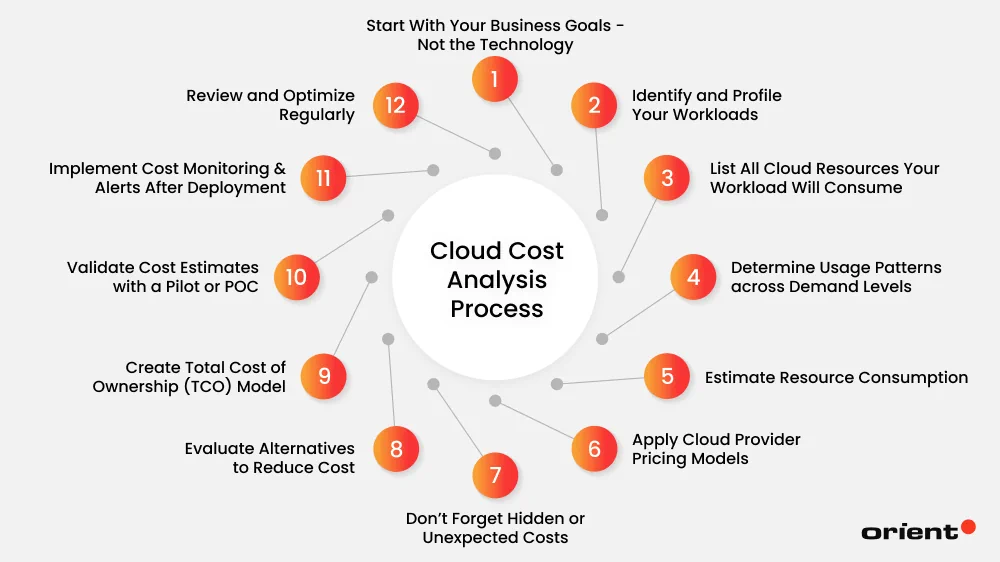
1. Start With Your Business Goals - Not the Technology
Without getting too technical, every process starts with understanding business needs. Before diving into pricing calculators or vendor quotes, take a step back and define what you want the cloud to achieve. Different companies have different reasons for deciding to “bring things to the cloud.” Some begin their cloud investments aiming to lower their infrastructure costs, while others seek a better infrastructure for enhanced scalability, faster performance, global coverage, or increased reliability.
Determining exactly what you want will help shed light on subsequent decisions. It becomes much easier to evaluate what cloud services you actually need and which ones you can ignore. For example, it is better for a business that focuses on cost savings to lean toward serverless computing and reserved instances instead of distributed architectures that prioritize auto-scaling needs.
Many companies overspend simply because they purchased cloud resources “just in case” without linking them to real business needs. By implementing this step, you give yourself and your team a clear framework for decision-making.
Here are some questions to help you clarify what you want and guide your future direction:
- Why are you moving to the cloud?
- To lower IT costs?
- Expand globally?
- Support a new application?
- Replace outdated hardware?
Each objective leads to very different technical requirements and very different costs. So, think carefully.
2. Identify and Profile Your Workloads
The workloads are what actually consume cloud resources. This includes everything from websites and APIs to analytics engines, machine learning pipelines, internal tools, scheduled batch jobs, mobile backends, and more. Without understanding your workloads, any attempt to estimate cloud budget becomes guesswork. Rather than simply listing the factors that affect a project, profiling gives you the details you need to accurately calculate cloud costs and avoid overspending. The purpose of this step is to understand what your applications need from a business and performance perspective.
Workload profiling answers questions like:
- What type of application? (web app, batch job, ML model)
- How does it behave? (traffic spikes, 24/7, seasonal)
- What performance does it require? (latency, throughput)
- How critical is it? (mission-critical vs. internal tool)
- What availability is required? (single region vs. multi-region)
- Next, list every application, service, or process that will run in the cloud.
Don’t just answer once. These questions should be asked for each workload type to best describe their characteristics.
3. List All Cloud Resources Your Workload Will Consume
Now that you know your workloads, it is time to translate the workload’s needs into specific cloud services and resource types that vendors charge for. In other words, this step helps you determine “What services you will use for each workload?”.
Although providing different pricing models, cloud providers such as AWS, Azure, and Google Cloud all have in common that charging is based on the specific services and resource types a client uses. That is why listing the services exactly your workloads consume is important, as it ensures your cost analysis is based on real data rather than assumptions.
Start this step by mapping each workload to the cloud services it will depend on. For example, compute resources (the listed workload) might include virtual machines, containers, or serverless functions (the consumed cloud resources). Similarly, storage requirements can be object storage for unstructured files and block storage for databases. Don’t forget to break down other cloud resources, such as network bandwidth, security services, and load balancers, to more accurately shape your final cloud spending.
4. Determine Usage Patterns across Demand Levels
Following a consumption-based approach, cloud pricing models are shaped by how much you consume, not just what you use. This sheds light on why some companies enjoy lower cloud computing costs, while others face higher expenses. Interestingly, even the same business with identical cloud workloads and resources can see costs rise significantly during seasonal spikes, making investing in cloud infrastructure more costly than before.
The point is that you should not let things happen without having a response plan ready for the most unexpected cases. To better manage risks and ensure that the user experience is always smooth, determining usage patterns for all possible future scenarios is necessary.
Usage patterns directly guide you to which pricing model to choose:
- On-demand instances → good for unpredictable workloads
- Reserved instances → best for stable 24/7 workloads
- Spot instances → cheap for flexible, interruption-tolerant tasks
- Auto-scaling → ideal for fluctuating traffic
- Serverless → perfect for event-driven or low-duty workloads
You can rely on historical data from at least the last six to twelve months to determine demand levels over time instead of relying solely on guesswork.
5. Estimate Resource Consumption
Now you need to understand something far more practical: how hungry your workloads actually are. This is where the math starts. For each workload, start by estimating the amount of compute power it requires, including:
- Number of CPU cores
- Amount of RAM
- Storage needed
- Bandwidth consumption
- Read/write operations
- Number of requests per second
- Database load
- Backup frequency
- Log volume
Think of each workload as a machine with specific fuel needs. A lightweight website might sip resources, while a data analytics engine gulps them around the clock. Instead of just estimating, turn these metrics into real numbers so you can easily come up with the final costs. Ask yourself and your development team the most practical questions possible. For example, “How many CPU cores does it need to perform well? Does it require 2GB of RAM or 32GB?” These numbers represent the foundation of your cloud bill, even before you consider scaling or peak traffic. When you aggregate all the specific resource consumption figures for the above factors, you will then get an overall picture of how your cloud environment will cost per month in the most realistic way.
6. Apply Cloud Provider Pricing Models
You have everything you need ready. What is the next step? The next step is to look at how cloud service providers charge for your listed resources. There are currently a number of popular cloud providers such as AWS, Azure, and Google Cloud in the market, and of course, they offer their own cloud cost models, discounts, and quirks.
Some factors you should consider when researching cloud vendors include:
- On-demand vs reserved pricing
- Regional costs (e.g., the US is cheaper than Asia-Pacific)
- Network egress fees
- Storage tiers (hot, cool, archive)
- Licensing models (Windows, SQL Server, etc.)
Cloud pricing is famously complex because it’s made up of hundreds of small components. For example, compute alone can have multiple tiers: on-demand pricing (pay-as-you-go), reserved instances (commit and save), and spot pricing (cheap but interruptible). Storage has even more layers: hot storage for frequently accessed data, cool or infrequent access tiers for rarely touched files, and deep archive storage for long-term retention. The more detailed you are about the service provider, the better your chances of finding the best solution to optimize cloud costs.
By mapping your workload’s needs to these pricing options, you can build an initial cost estimate. Be prepared that the cloud cost analysis is only an estimation. It will certainly have errors, but it gives you a baseline. If you don’t have technical experts on hand to assist, it’s best to contact the cloud service provider directly for customized advice that best suits your project and business.
7. Don’t Forget Hidden or Unexpected Costs
One of the biggest mistakes businesses often make in cloud cost allocation is that they assume all listed cost components tell the whole story. In reality, the cloud has a long tail of small, often invisible charges that quietly accumulate in the background. These hidden expenses are often not obvious while you’re planning, but they gradually appear once the project is operational and easily inflate your total cloud spend by 20-40%.
Most cloud overruns happen because teams forget these:
- Data transfer fees
- API request charges
- Monitoring and logging costs
- Storage retrieval fees
- Backup storage
- Premium support plans
- Additional security tools
- IP address charges
- Load balancer hours
- Scaling events
- Overprovisioned resources
- Idle resources
Most hidden costs stem from the things your workloads do around the main compute tasks. Every log your application writes, every metric you track, every backup you store, every API request your SaaS tools make - all of these create additional charges. These costs may seem small and insignificant. However, when compounded at scale, they can add up to a significant expense. The smartest approach here is to consider all potential components that are likely to add costs early in your analysis.
8. Evaluate Alternatives to Reduce Cost
But what if the cloud infrastructure cost is still out of your control? Yes, implementing savings plans is necessary at this stage, if not too late. That is why, right from the beginning, in cloud cost analysis, you must prepare solutions for optimizing costs.
In this step, take a step back and ask a crucial question: Is there a cheaper way to run this workload without compromising performance? As the cloud offers multiple options for running the same workload, your previous choice, or a popular choice, may not be the smartest strategy.
Before finalizing your estimate, it is necessary to spot wasteful cloud behaviors and review cost-saving opportunities. For example:
- Move workloads to spot or reserved instances
- Use serverless instead of always-on compute
- Right-size instances (most companies oversize by 50-70%)
- Use object storage instead of block storage
- Consolidate resources
- Use managed services to reduce operational costs
- Choose cheaper regions
Small decisions here can lead to massive savings later. These cloud cost optimization strategies are crucial for obtaining a realistic and efficient cost estimate.
9. Create Total Cost of Ownership (TCO) Model
In addition to the cost components related to your workloads and cloud services you use, don’t forget to include other important surrounding expenses that go beyond the monthly cloud bill by creating a Total Cost of Ownership (TCO) model. A TCO model typically involves: cloud resource cost, labor and operations, migration cost, training cost, monitoring and security tools, maintenance and support, network and connectivity, and third-party licenses.
This provides a comprehensive long-term (1-3 years) financial outlook - not just a monthly bill.
10. Validate Cost Estimates with a Pilot or POC
Before committing to a full cloud rollout, validate your estimates with a small-scale pilot or proof of concept (POC) to test your assumptions in a controlled environment.
You can deploy a scaled-down version of your workload, run real traffic through it, and monitor how it consumes compute, storage, bandwidth, and database operations. This hands-on data often reveals things you wouldn’t have caught on paper because everything is actually being operated, just on a smaller scale. In some cases, the pilot even reveals the opposite of what you document. For instance, a workload once deemed ideal for the cloud turns out to be too expensive to run as-is, prompting architectural changes or even rethinking the deployment model.
This is a short guide on how to conduct a cloud pilot or POC:
- Choose one representative workload
- Define success criteria such as cost accuracy, performance, scalability, latency, reliability, or resource usage.
- Set up a minimal cloud environment (with only the required compute, storage, database resources, and networking)
- Deploy the workload
- Monitor everything from CPU, RAM, storage, bandwidth, IOPS, to database queries, API calls, logs, and egress traffic.
- Compare real usage with your estimates
- Experiment with alternatives such as different instance types, serverless options, storage tiers, or pricing models.
- Document findings and refine cost models
Skipping this step will probably save you time, but it often leads to far more expensive and time-consuming problems later, as you are betting all your predictions and every part of your cloud cost analysis plan is accurate.
11. Implement Cost Monitoring & Alerts After Deployment
And when the cloud pilot is working as planned, your cloud environment is ready to go live.
As cloud costs can shift quickly and sometimes in a matter of hours, especially when workloads scale automatically or resources are accidentally left running, it is a must to next implement cost monitoring and set up alerts (for budget limits, unexpected spikes, idle resources, over-provisioned resources) to keep your cloud budget predictable and prevent unpleasant surprises.
There are many built-in tools on the market today that help you do this. Most of them are for tracking your spending and managing cloud costs in real time and automatically. By enabling cost dashboards, daily spend summaries, and breakdowns by workload or resource type, you gain immediate visibility into where your cloud budget is going.
Top cloud cost management tools include:
| Tool | Platform | Best Fit |
|---|
| AWS Cost Explorer | AWS | Teams that need quick visibility into AWS spending and basic optimization insights. |
| AWS Budgets | AWS | Organizations that want customizable budget alerts and cost thresholds within AWS. |
| Azure Cost Management | Azure | Businesses running heavily on Azure and needing built-in cost tracking and optimization. |
| Google Cloud Cost Management | Google Cloud | Teams using GCP that need real-time spending insights and built-in budget controls. |
| GCP Cloud Billing Reports | Google Cloud | Users who want detailed billing breakdowns and spend analytics by project, label, or service SKU. |
| CloudHealth (VMware) | Multi-cloud | Enterprises managing large cloud environments requiring governance and FinOps maturity. |
| Cloudability (Apptio) | Multi-cloud | Organizations that need enterprise-grade forecasting and financial accountability. |
| Kubecost | Kubernetes | Teams running Kubernetes clusters that need granular container-level cost visibility and optimization. |
12. Review and Optimize Regularly
Cloud environments are dynamic, and businesses are constantly growing, causing workloads to change over time. That’s why your estimated cloud costs always change in ways that spreadsheets can’t always anticipate.
Gone are the days when cloud computing cost analysis was a strategy that was only done once in the process. Cost trends today are tied directly to the deployments, and cost is treated as a real-time metric rather than something reviewed months later. This cultural shift is a key part of FinOps, helping teams add real-time visibility, accountability, and continuous optimization to their cloud projects.
Of course, the monthly/quarterly/yearly review cycle is still a good starting point for cloud cost monitoring if you are a small or low-usage business. However, reviewing cycles alone will not be enough for enterprise, multi-cloud, or dynamic environments. Instead, it is a better idea for them to follow FinOps for managing cost spikes, optimizing resource usage, and aligning engineering decisions with financial goals. By conducting cloud optimization regularly, businesses can save up to 20-50% ongoing cloud expenses.
Where to Get Cloud Support?

When you carefully analyze cloud costs, you uncover factors that are often overlooked, especially data transfer costs, which can quickly become one of the largest expenses if not monitored. That’s why it can be said that a thoughtful cloud cost analysis doesn’t just help you plan; it helps you make better decisions.
At Orient Software, we’re committed to helping businesses navigate the challenges of cloud adoption with the right tools, architecture, and guidance. From evaluating workloads to implementing best practices for long-term optimization, our team ensures that you get the most value from your cloud investment. If you’re ready to take control of your cloud spending and build a smarter cloud strategy, Orient Software is here to help you every step of the way. Contact us to learn more about our cloud computing services.